The Best Free Online HTML Editor and Cleaner
This free online WYSIWYG HTML editor allows you edit your source code without downloading and installing any application. Guaranteed the best visual webpage builder with AI integration.
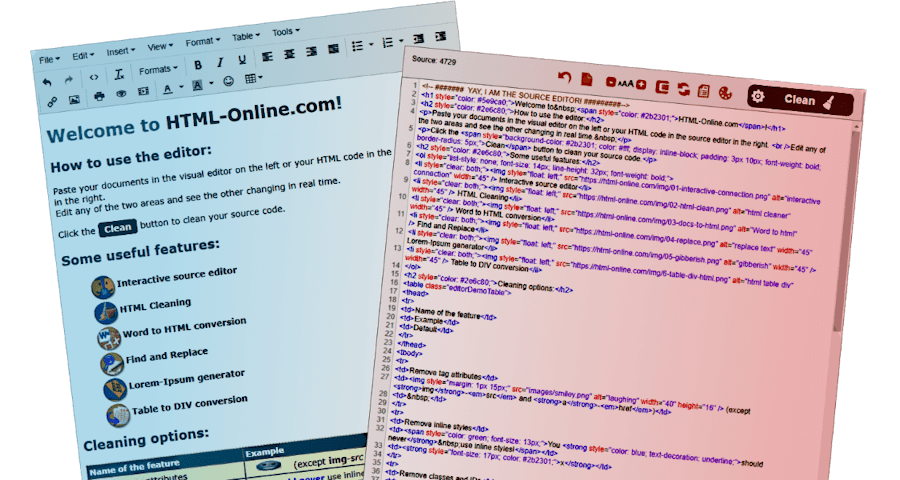
Online HTML Editing Tools
Compose the perfect HTML source code online in your web browser without registration and without downloading any program, for Free!
Generate HTML templates just like with CoffeCup, CKEditor or TinyMCE but this time see the source code changing with the editor! PSD and PDF converters are coming soon for PHP, ASP, Linux etc. with many examples for you to learn coding!
Convert almost any digital document format to a well-composed web article with just a few mouse clicks.
... or browse our collection of HTML tips, tricks and tutorials.
Categories: Articles | CSS | Freebies | HTML | JavaScript | jQuery | Tools

Share with love
Latest Articles
Main HTML Editor Features

Interactive source editor
Access your visual content and source code next to each other and whichever you edit see the other change instantly in real time.

HTML Cleaning
Activate the desired cleaning options and turn your messy HTML to a nice and clean code. Once you try this you'll always use this to bulk edit your code.

Word to HTML conversion
Copy and paste your documents in the visual editor and convert it to a clean web-friendly format. It works with Microsoft Word, Excel, PowerPoint, PDF, Google docs and almost anything you can imagine.

Find and Replace
The Find and Replace tool allows you to perform one or more text replacements in your HTML. This will be executed once you click the clean button and the cleaning options have been performed.

Lorem-Ipsum generator
Every web publisher might need a good gibberish text generator for his editor to fill the page until the live content takes its place.

Online document editing
Drag and drop Word, other rich-text, or HTML files into the editor to open and edit them instantly in your browser. No installation needed. Then export your document in the format you need.
Source Cleaning Options

Remove tag attributes

Remove inline styles

Remove classes and IDs

Remove all tags

Remove successive spaces

Remove empty tags

Remove span tags, images, links or tables

Remove AI Watermarks

Organize lines
Latest Articles
Testimonials
Anna P.
Content Manager
Tom
Highly recommended! Olga
Why is this just perfect?
Here are a couple of reasons why we recommend the online HTML editor.

Online
The editor is compatible with every major web browser without installing any program, extension or plugin. Just open it online and access all features instantly.

Anonim
You are free to use the HTML editor without registration and login. Your content is never sent to the server so your confidential documents remain safe. We only use cookies for analytics and for saving your preferred settings.

Free
We would like to keep this a free service. For this we ask for your support by donating, sharing in social media or linking to our website. Help others find this useful online tool.

Evolving
We keep working eagerly on adding new features to this software. Stay connected to find our latest updates.
Powered by:




How to Use the Online HTML Editor?
The best real-time online HTML editor with dynamic instant live visual preview, inline WYSIWYG editor and source cleaning features. Includes a HTML viewer, editor, compressor, beautifier and easy formatter. It's impossible to create invalid code with this tool.
The operation of this free online tool with built-in HTML cleaner is very intuitive and it's working in your web browser without installing any additional program. Compose your text using the WYSIWYG editor on the left and adjust formatting of the source code on the right. To convert Microsoft Word, PDF or any other rich-text documents to HTML, simply paste it in the visual editor. Perform bulk operations on the HTML code by clicking the Clean button after adjusting the settings.
Before you start composing the content for a live website I advise you to experiment with the features populating the work area with a demo text clicking the Quick Tour menu option.
The visual editor works like a regular text composer, just use the commands above the text area to adjust the content and in the meantime you'll notice the source editor changing with it. If you're familiar with HTML code composing then you can adjust the code on the right.
Being a free demonstration for the pro version, this tool has its limitations such as showing ads and having fewer options.
The Control Panel of the WYSIWYG Editor
|
The control panel above the HTML source editor lists the most important commands: Clean
Execute all options that are checked in the settings (see gear icon above). |
Div Table Styling
Make sure you apply the CSS code below when you publish tables converted to div elements. Try the interactive online table styler which can generate grids from both div and table elements.
	.divTable{display:table;width:100%}
	.divTableRow{display:table-row}
	.divTableHeading{background-color:#ddd;display:table-header-group}
	.divTableCell,.divTableHead{display:table-cell;padding:3px 10px;border:1px solid #999999}
	.divTableHeading{display:table-header-group;background-color:#ddd;font-weight:bold}
	.divTableFoot{display:table-footer-group;font-weight:bold;background-color:#ddd}
	.divTableBody{display:table-row-group}
Click and copy the code from the field below:
Other Important Features
Use these HTML editor features to practice and to maximize your coding efficiency.
- Document converter
To convert any visual document like Excel, PDF, Word to HTML just paste the doc in the visual editor and the markup will show up instantly on the right. - Online text editor
Compose documents, just like in any rich text editor. Use the control panel to include images, tables, headings, lists and other items in your paper. - Copy - paste
The editor won't allow you to save the documents. For this you have to copy your generated code into a blank text file, change its extension to .html and open it in a web browser. If you use a CMS, like Wordpress, then you have to copy the code in the back-end and publish the page/article. - Work with tables
Using the WYSIWYG editor panel you can create a table of any dimmension with only 2 clicks. There's a cleaning option to convert them to structured and styled DIV tags. - Undo
Both editors have this function which allows to revert back to a previous state if something goes wrong. For example, to restore the document before performing the cleaning. - Interactive demo
Take a 4-step tour going through the features clicking the Quick Tour menu item. Learn how to use the redactor and experiment with the demo text.
Never forget!
- Have a backup before using this tool to make sure you can revert
back to your original document. - Always double check your code before publishing on a live website.
Check the quality of the article. - This editor never saves or sends out your document, all operations
are performed on client-side, on your local device. - Like most websites, we also use cookies to save your settings for your
next visit, to collect anonymous visitor analytics and to show tailored ads. - Don't forget to bookmark this page Ctrl + D and share with your friends
and colleagues.