When you are building a website, performance should be one of your first concerns, right alongside buying a domain. A domain name gives your site an identity, but performance determines whether visitors will stay long enough to trust it. Speed⏱️, stability⚓ and usability👌 all shape how people experience your site, often within the first few seconds.

Many site owners focus heavily on design or content and overlook the technical foundation. That foundation is made up of two essential elements: HTML and web hosting. Together, they control how quickly your site loads and how smoothly it runs. If you understand their role, you can make smarter decisions and avoid performance problems before they start.
Why HTML plays a key role in website speed🏎️
HTML is the structure of your website. It tells the browser what each piece of content is and how it should be organized. When that structure is clean and logical, browsers can load and display pages faster. When it’s cluttered or inconsistent, performance suffers.
Think of HTML as a set of instructions. Clear instructions are easy to follow. Confusing ones slow everything down. Using meaningful tags like header, main, section and footer helps browsers understand your layout quickly. These elements reduce unnecessary processing and make your pages easier to render. They also make your site easier to maintain as it grows.
Clean HTML improves usability and accessibility
Good HTML does more than speed things up 🚀. It also improves usability for real people. Screen readers rely on proper structure to guide users through content. Search engines rely on it to understand what matters most on a page. When headings follow a logical order and navigation areas are clearly defined, everyone benefits.
Clean HTML also reduces file size. Smaller files download faster, which is especially important for mobile users or visitors on slow connections. Even small reductions can improve load times and lower bounce rates.
Common HTML mistakes that hurt performance
Many performance issues come from habits that seem harmless. Using too many nested elements forces browsers to work harder. Leaving unused code in templates adds weight without value. Relying heavily on inline styles makes pages harder to process and maintain.

Another common issue is missing image dimensions. When width and height are not defined, the browser cannot reserve space ahead of time. This causes layout shifts as the page loads, which feels slow and unpolished to users. Fixing these issues does not require advanced skills. It requires attention and consistency.
How web hosting affects loading speed
While HTML defines what loads, web hosting determines how fast it gets delivered. Every time someone visits your site, their browser requests files from your hosting server. The speed of that response has a major impact on performance.

A reliable hosting provider offers fast server response times, consistent uptime and enough resources to handle traffic without slowing down. A weak hosting setup can delay page loads even if your HTML is perfectly optimized.
Benefits of choosing a fast hosting provider
- Faster server response time ⏱️
- Higher uptime and availability ✔️
- Better handling of traffic spikes 📈
- Fewer performance bottlenecks ⚙️
- Improved user experience and lower bounce rate 👤
This is why two similar websites can feel completely different. One responds instantly. The other hesitates. The difference often comes down to hosting quality.
Hosting types compared
| Hosting Type | Performance | Best For |
|---|---|---|
| Shared hosting | Low – server resources shared by many sites | Small personal or low-traffic sites |
| VPS hosting | Medium – dedicated virtual resources | Growing sites needing more stability |
| Dedicated hosting | High – full control over server resources | Large, high-traffic websites |
| Cloud hosting | Very High – scalable, distributed environment | Apps and sites with global audiences |
Hosting features that support better performance
Modern hosting services offer tools that directly improve speed and stability. Server-side caching reduces repeated processing. Solid-state drives load files faster than traditional storage. Content delivery networks serve files from locations closer to visitors, reducing delay. Automatic compression reduces the size of HTML and other assets before they are sent to the browser.

You do not always need the most expensive plan, but you do need one that matches your site’s size and traffic. As a site grows, moving beyond basic shared hosting often becomes necessary to maintain consistent performance.
How HTML and hosting work together
HTML and web hosting should not be treated as separate concerns. They support each other. Well-structured HTML reduces the workload on the server. Fast hosting ensures optimized files reach users quickly. When both are aligned, performance improves noticeably.
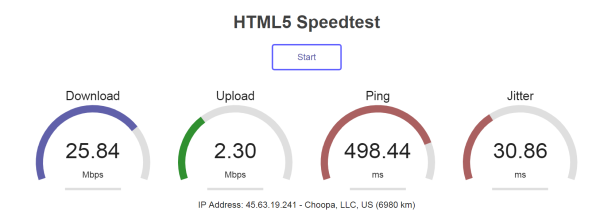
Imagine a lightweight page delivered from a faster server with caching enabled. The browser receives the content quickly, processes it easily and displays it smoothly. That is the experience users expect.
If either side is neglected, performance suffers. Heavy HTML strains servers. Slow hosting delays delivery. Balance matters.
Practical steps to improve performance
If you want better results, focus on fundamentals. Review your HTML and remove unnecessary elements. Use semantic tags consistently. Make sure headings are logical and images have defined dimensions. Validate your markup to catch errors early.
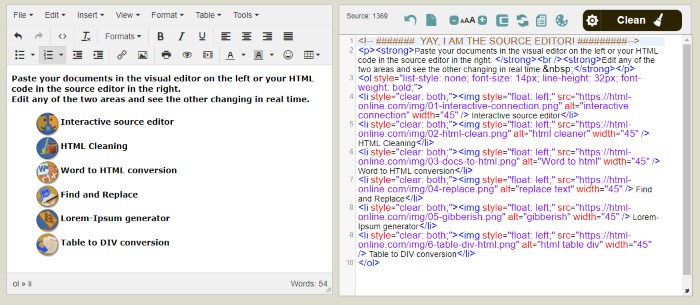
Use our free online HTML editor for an optimized, error-free markup
Then evaluate your hosting. Check server response times. Enable caching where possible. Use HTTPS. Consider a content delivery network if your audience is spread across regions.
Finally, test your site regularly. Performance tools can show how changes affect real-world metrics. Even small improvements can lead to better engagement and longer visits.
Performance shapes first impressions
Users may never think about HTML or hosting, but they feel the results. Fast websites feel trustworthy and professional. Slow ones feel unreliable. Performance influences search rankings, user confidence and conversions. It shapes how people judge your site within seconds.

By combining clean HTML with dependable hosting, you create a strong foundation for everything else you build online. That foundation allows your content, design, and functionality to perform at their best.
Focus on clarity. Focus on speed. Those choices make all the difference.